

Microsoft has announced a major update to its intelligent assistant, Fabric Copilot, that significantly improves DAX query generation in Power BI. Thanks to the addition of more advanced Azure Foundry models, DAX formula creation is now more precise, contextual, and stable than ever.
Key improvements to DAX generation with Copilot
Starting in May 2025, Copilot integrates improvements in the following key areas:
· Greater accuracy in automatically generated DAX queries.
· Better understanding of the context of rows and filters in DAX, allowing for more efficient and accurate formulas.
· Advanced use of inactive relationships in semantic models, which expands the types of analyses possible.
· Stability in responses, offering consistent results even when questions are phrased in different ways.
Where are DAX enhancements available with Copilot?
· View DAX queries in the web version of Power BI.
· Edit reports in Power BI Web with Copilot by chatting with the data.
And starting with the May 2025 releases of Power BI Desktop, they will also be available in:
· Copilot in the DAX Query View on the desktop.
· Copilot answering questions with natural language in the report view.
· Semantic models used in conjunction with Data Agent in Fabric.
Practical example: Smart DAX queries with Copilot
Using the Adventure Works sample data, it is possible to ask:
“What is the top product by percentage of total online sales per year, based on shipping date?”
Copilot generates a DAX query that uses inactive relationships and multiple steps to identify the leading product by year. Additionally, when editing a report in Power BI Web, you can ask:
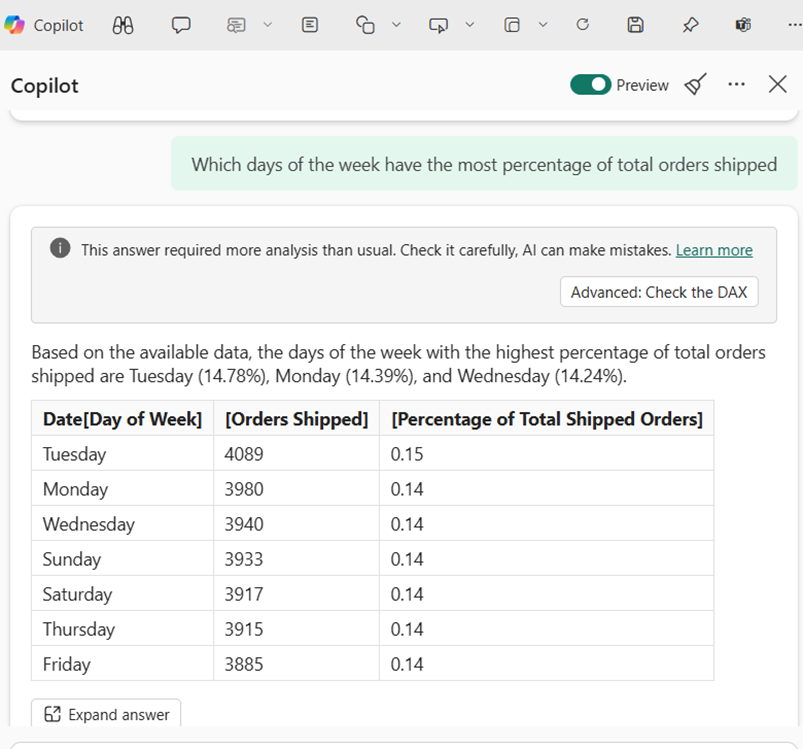
“Which days of the week have the highest percentage of shipped orders?”
The response includes the corresponding DAX query, an interpreted summary of the results, and the option to modify the code directly in the DAX Query View using Copilot.
More Copilot features
Improved semantics and personalization
Copilot now also benefits from:
· Descriptions and synonyms of fields in the semantic model.
· Sample data and display folders.
· Hierarchies within the data model tables.
Do you want to try it?
Learn more and get started with these features at the following official resources:
· Copilot for writing DAX queries
· Copilot integration in Power BI
· View DAX queries in Power BI
· Create a data broker in Microsoft Fabric (preview)